> ## Documentation Index
> Fetch the complete documentation index at: https://upstash-worktree-docs-descriptions.mintlify.site/llms.txt
> Use this file to discover all available pages before exploring further.
# Debug Logs
> Understand the QStash message lifecycle and states like ACTIVE, DELIVERED, RETRY, and FAILED to debug delivery using the console Logs tab.
To debug the logs, first you need to understand the different states a message can
be in.
Older logs are removed automatically. See our [pricing page](https://upstash.com/pricing/qstash) for log retention limits.
## Lifecycle of a Message
To understand the lifecycle of each message, we'll look at the following chart:
[comment]: # "https://mermaid.live/edit#pako:eNptU9uO2jAQ_RXLjxVXhyTED5UQpBUSZdtAK7VNtfLGTmIpsZHjrEoR_17HBgLdztPMmXPm4ssJZpIyiGGjiWYrTgpF6uErSgUw9vPdLzAcvgfLJF7s45UDL4FNbEnN6FLWB9lwzVz-EbO0xXK__hb_L43Bevv8OXn6mMS7nSPYSf6tcgIXc5zOkniffH9TvrM4SZ4Sm3GcXne-rLDYLuPNcxJ_-Rrvrrs4cGMiRxLS9K1YroHM3yowqFnTkIKBjIiMVYA3xqsqRp3azWQLu3EwaFUFFNOtEg3ICa9uU91xV_HGuIltcM9v2iwz_fpN-u0_LNYbyzdcdQQVr7k2PsnK6yx90Y5vLtXBF-ED1h_CA5wKOICF4hRirVo2gDVTNelCeOoYKdQlq1kKsXEpy0lb6RSm4mxkByJ-SFlflUq2RQlxTqrGRO2B9u_uhpJWy91RZFeNY8WUa6lupEoSykx4gvp46J5wwRtt-mVS5LzocHOABi61PjR4PO7So4Lrsn0ZZbIeN5yWROnyNQrGAQrmBHksCD3iex7NXqbRPEezaU7DyRQReD4PILP9P7n_Yr-N2YYJM8RStkJDHHqRXbfr_RviaDbyQg9NJz7yg9ksCAfwCHGARn6AfC9CKJqiiT83lf_Y85mM5uEsurfzX7VrENs"
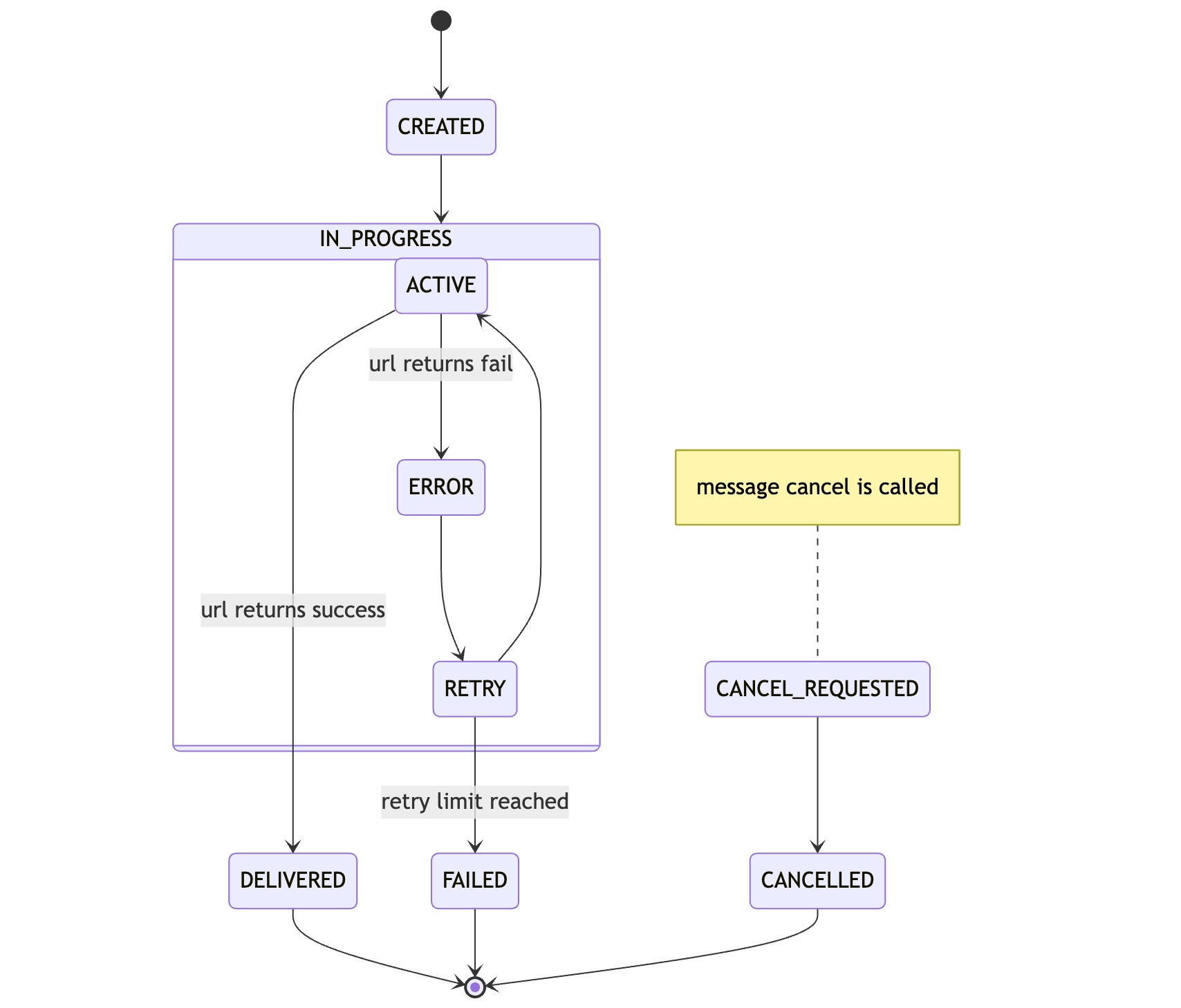 Either you or a previously setup schedule will create a message.
When a message is ready for execution, it will be become `ACTIVE` and a delivery to
your API is attempted.
If you API responds with a status code between `200 - 299`, the task is
considered successful and will be marked as `DELIVERED`.
Otherwise the message is being retried if there are any retries left and moves to `RETRY`. If all retries are exhausted, the task has `FAILED` and the message will be moved to the DLQ.
During all this a message can be cancelled via [DELETE /v2/messages/:messageId](/qstash/api-reference/messages/cancel-a-message). When the request is received, `CANCEL_REQUESTED` will be logged first.
If retries are not exhausted yet, in the next deliver time, the message will be marked as `CANCELLED` and will be completely removed from the system.
## Console
Head over to the [Upstash Console](https://console.upstash.com/qstash) and go to
the `Logs` tab, where you can see the latest status of your messages.
Either you or a previously setup schedule will create a message.
When a message is ready for execution, it will be become `ACTIVE` and a delivery to
your API is attempted.
If you API responds with a status code between `200 - 299`, the task is
considered successful and will be marked as `DELIVERED`.
Otherwise the message is being retried if there are any retries left and moves to `RETRY`. If all retries are exhausted, the task has `FAILED` and the message will be moved to the DLQ.
During all this a message can be cancelled via [DELETE /v2/messages/:messageId](/qstash/api-reference/messages/cancel-a-message). When the request is received, `CANCEL_REQUESTED` will be logged first.
If retries are not exhausted yet, in the next deliver time, the message will be marked as `CANCELLED` and will be completely removed from the system.
## Console
Head over to the [Upstash Console](https://console.upstash.com/qstash) and go to
the `Logs` tab, where you can see the latest status of your messages.